I hear the same thing from outbound operators every week. They have the mailboxes. They have the leads. They have the sequences. What they do not have is enough time.
Cold email at scale is mostly operational work. Building campaigns. Checking mailbox health. Pulling stats. Figuring out what worked and what flopped. It takes time away from the work that actually builds pipeline.
That is why I use Claude Code with the Salesforge MCP Server. Once it is connected, I can run a big part of my cold email workflow through prompts instead of jumping between tools. I can build sequences, review performance, and catch sender issues before they hurt the campaign. Let me walk you through it.
MCP stands for Model Context Protocol. Anthropic launched it in late 2024 as an open standard. The idea is simple. Instead of writing custom glue code for every AI integration you point an MCP client at a server. The server tells the client what tools it has.
The Forge MCP Server is a single endpoint that exposes the entire Forge Stack. Six products. One connection.
Three steps. Nothing fancy.
Log into each Forge product you use. Go to Settings then API and Add new key
A Salesforge key alone covers a lot. Mailboxes. Sequences. Contacts. Analytics. Add Warmforge if you want Claude Code to check heat scores. Add Leadsforge if you want it to pull contacts. You can always add more keys later.
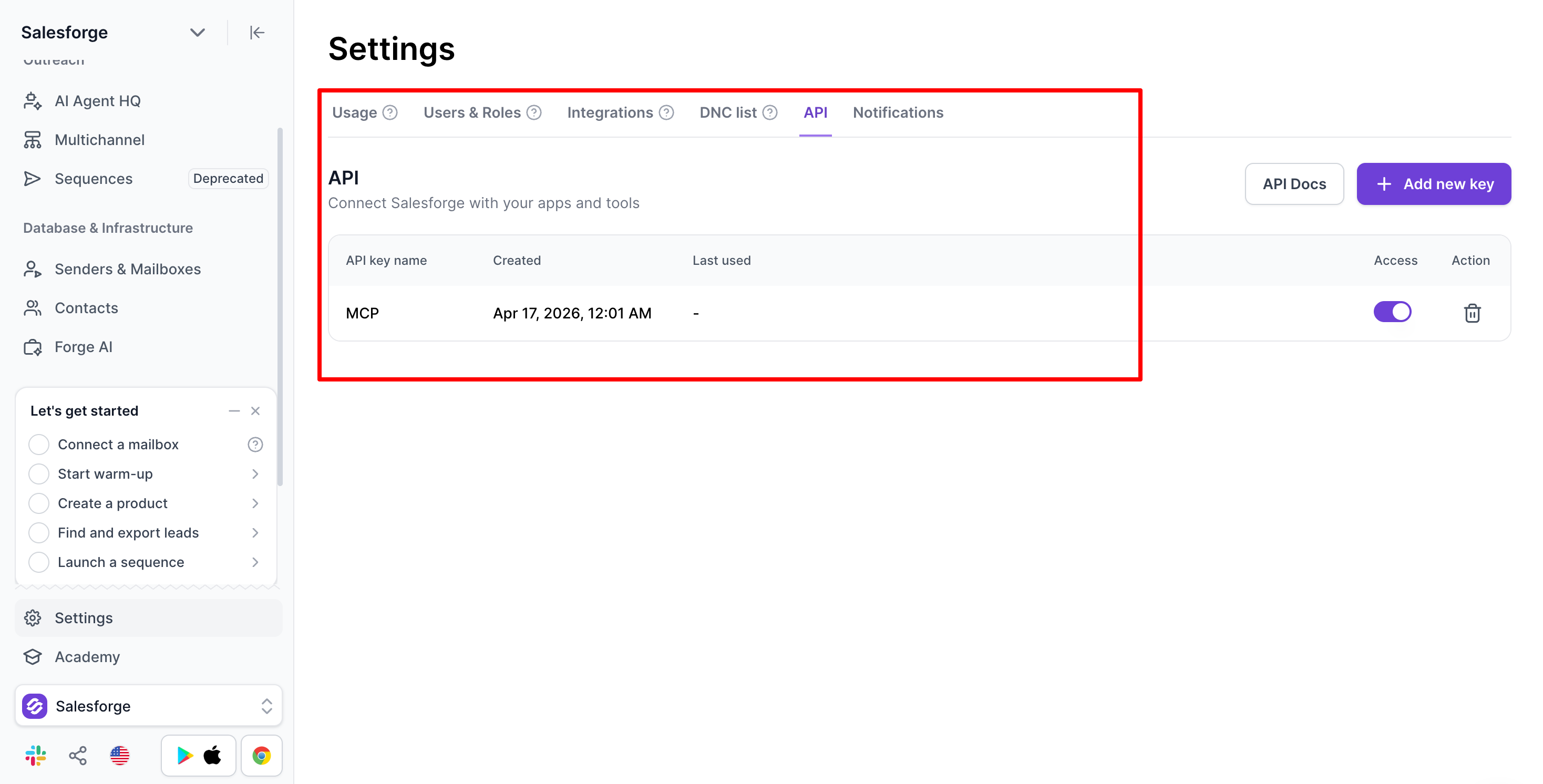
Open your terminal. Run this command. Replace the placeholders with your real keys. Delete any header line for a product you do not use.
claude mcp add salesforge \
  --transport streamable-http \
  --url https://mcp.salesforge.ai/mcp \
  --header "X-Salesforge-Key: YOUR_SALESFORGE_API_KEY" \
  --header "X-Primeforge-Key: YOUR_PRIMEFORGE_API_KEY" \
  --header "X-Leadsforge-Key: YOUR_LEADSFORGE_API_KEY" \
  --header "X-Infraforge-Key: YOUR_INFRAFORGE_API_KEY" \
  --header "X-Warmforge-Key: YOUR_WARMFORGE_API_KEY"
  --header "X-Mailforge-Key: YOUR_MAILFORGE_API_KEY"
On Claude Desktop the same config goes into claude_desktop_config.json under Settings > Developer > Edit Config.
Read full guide on How to Add Forge MCP
Restart Claude Code. Run /mcp to check the salesforge server is listed. Then ask something easy like "list my Salesforge workspaces." If it works you see data in seconds.
This is the first workflow I automated. Mailbox health is the foundation. If your mailboxes are not healthy nothing downstream matters.
Three signals to watch every week:
Here is the prompt I run every Monday morning:
List all my active Salesforge mailboxes. Pull reply rate over the last 7 days for each one. Flag anything under 1% and anything with zero replies. Return a clean table.
Claude Code calls the Salesforge tools. It pulls the data. It hands back a table. Pausing a flagged mailbox is a one-line follow-up. So is swapping in a backup from Primeforge or Infraforge.
One rule I stick to. Keep about 50 percent of your installed capacity as warmed backups. If you run 60 mailboxes have 30 ready to swap. When something gets flagged you pause and replace it the same day.
New mailboxes go through Warmforge for at least 14 days before sending. Target heat score of 85 or higher. Claude Code can check heat scores on demand so you know exactly when a mailbox is ready.
Good cold email starts with full context. Before Claude Code drafts anything I share four things with it in the prompt or project context:
A proper cold email sequence has 4 to 5 steps. Here is the structure I use:
If you are new to cold email structure the A-Z cold email guide breaks down the fundamentals before you start automating.
The meme breakup works because it is human. It breaks the pattern. After three or four professional messages the recipient sees something funny and it lands differently. I have seen breakup memes pull reply rates 2x higher than the email right before it.
Channel rules matter more than people expect. What works in email does not work on LinkedIn. I covered this in depth in the
cold email vs LinkedIn comparison. Here is the summary:
With the context loaded the prompt to build a full sequence is short:
Create a 5-step cold email sequence for CROs and make sure follow up subject lines are same. Pain: manual pipeline reporting. Use 3 follow-ups that shift angles each time. Make the last step a meme breakup. Show drafts before pushing to Salesforge.
I always ask to see drafts first. Claude Code hands them over. I edit. A follow-up prompt pushes the full sequence into Salesforge with the right mailboxes and schedule. One session. ICP to live campaign.
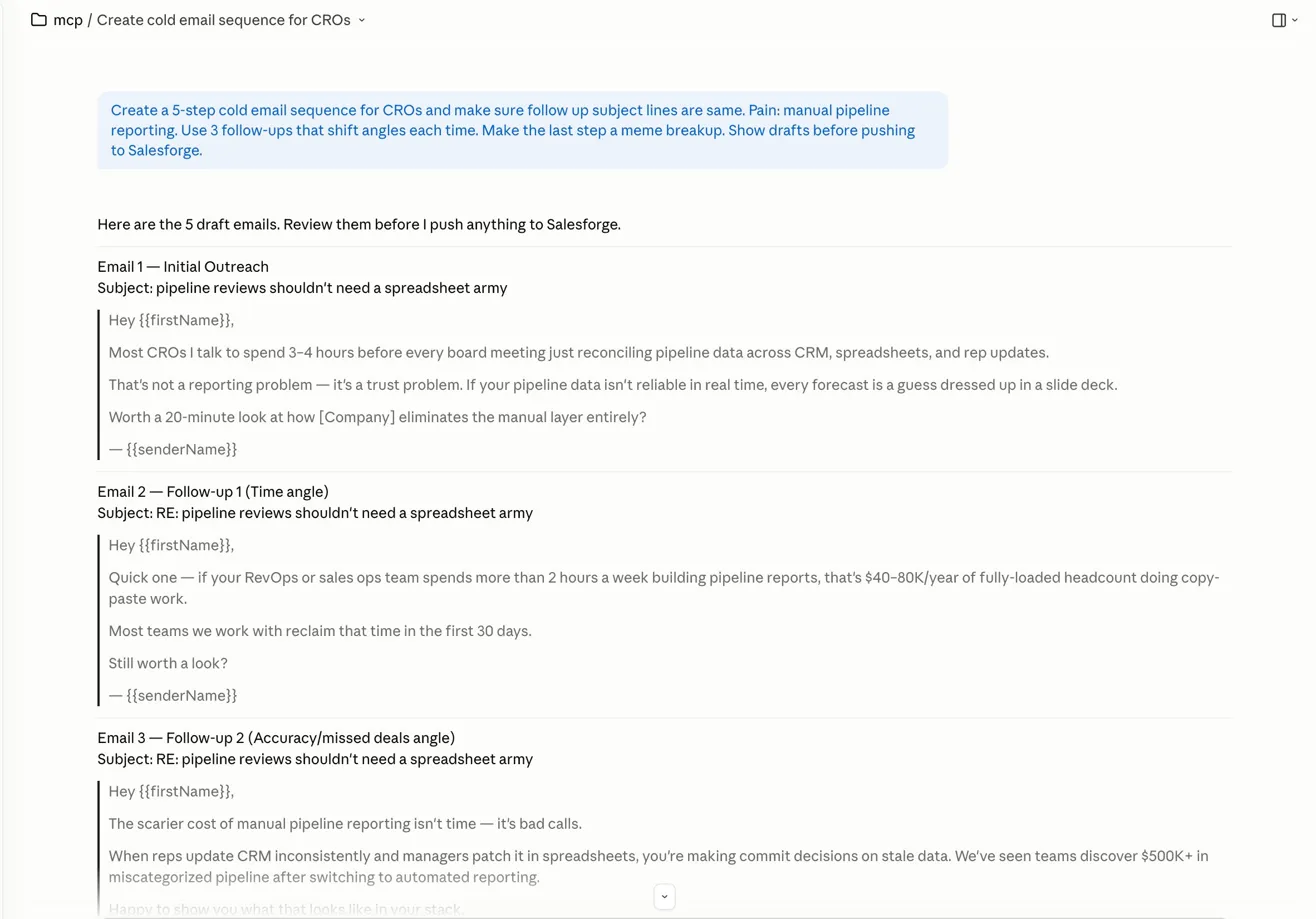
This is the workflow that changed the most for me. Before the MCP my weekly review meant exporting CSVs. Pivoting in a spreadsheet. Reading reply threads one by one. Now I ask a question and get an answer.
Pull stats for all active campaigns over the last 7 days. Find the top 3 by reply rate. Read the positive-reply threads for each one. Tell me which step in the sequence got the reply. Summarize what the winning campaigns have in common. Propose two tests for next week.
Claude Code reads the threads. Not just the numbers. It tells me which step pulled the reply. Was it the initial email or was it follow-up 3? Was it the meme breakup? This changes how I build the next campaign.
A few things I have learned from doing this weekly:
Yes. Salesforge handles email and LinkedIn from one platform. The Forge MCP Server exposes LinkedIn sender profiles and sequences as tools just like email.
The catch is giving Claude Code clear channel rules. If you forget them it will just swap the channel name and ship the same copy. That does not work.
My LinkedIn playbook through Claude Code:
If neither DM gets a reply I send one last message. A meme. Same idea as the email breakup. Something light that says "looks like the timing is off" without being pushy. It works better than a third pitch would.
For a deep dive on when to use email vs LinkedIn and how to combine them check out cold email vs LinkedIn outreach.
Automation is great until it is not. A few things I keep manual on purpose:
Claude Code removes the repetitive work. It does not remove the parts that need real judgment.
If you run multiple clients you can add multiple MCP instances. Each one gets its own name and its own keys. In a prompt you just say which client you mean. Claude Code picks the right tools.
"mcpServers": {
    "salesforge-client-a": {
      "command": "npx",
      "args": [
        "-y",
        "mcp-remote",
        "https://mcp.salesforge.ai/mcp",
        "--header",
        "X-Salesforge-Key:CLIENT_A_SALESFORGE_KEY",
        "--header",
        "X-Primeforge-Key:CLIENT_A_PRIMEFORGE_KEY"
      ]
    },
    "salesforge-client-b": {
      "command": "npx",
      "args": [
        "-y",
        "mcp-remote",
        "https://mcp.salesforge.ai/mcp",
        "--header",
        "X-Salesforge-Key:CLIENT_B_SALESFORGE_KEY",
        "--header",
        "X-Primeforge-Key:CLIENT_B_PRIMEFORGE_KEY"
      ]
    }
  }
}
Client data stays separate. No accidental mixing. This is also how Salesforge Whitelabel partners run outreach across dozens of accounts without custom tooling.
Time savings are the obvious part. The bigger win is what you start to see.
Run the same weekly analysis for a month and you stop guessing. You know which ICP responds to which pain point. You know which step in the sequence pulls replies. You know whether the meme breakup works better for mid-market CROs or for startup founders. You catch mailboxes drifting before they become a problem. None of this shows up when you work manually.
The other win is consistency. Claude Code runs the same check the same way every Monday. It does not skip a week because you were traveling. That consistency compounds. In cold email it is what separates teams that scale from teams that stall.
The Forge MCP Server lives at https://mcp.salesforge.ai/mcp. It works with any MCP client. That includes Claude Code. Claude Desktop. Cursor. Windsurf. One endpoint. All six Forge products.
No. Basic terminal comfort helps but you do not have to write code. Setup is a single config block with your API keys. After that you describe what you want in plain English. Claude Code picks the right tool.
4 to 5 steps. One initial email and 3 to 4 follow-ups. Each follow-up should shift the angle. The last follow-up should be a meme breakup. It sounds funny but it works. The pattern break pulls replies that a fifth professional email never would.
3 steps total. A blank connection request. One DM after acceptance. One follow-up DM. If neither lands send a meme breakup as the final message. Keep everything short and conversational. No pitching in the first message.
Once a week. Monday morning is a good rhythm. Look for mailboxes under 1 percent reply rate. Look for mailboxes with zero replies. Catch drift early. It is cheap to fix in week one. Expensive by week four.
Agent Frank is the autonomous AI SDR inside Salesforge. He prospects. Writes. Sends. Follows up. You get a dedicated account manager who helps set him up. Claude Code with the Salesforge MCP is hands-on.
.jpg)



.jpg)
