I spend most of my week looking at two things: what is going on inside Salesforge, and what is going on across the Forge stack that supports it. Mailboxes, reply rates, warmup scores, domain health, sequence performance. That is the real job of running outbound.
For a long time, the only way to look at any of this was to open the dashboard, click around, export something, and then drag that data into another tool to reason about it. Even if you loved the product, the workflow was slow.
A cold email MCP server changes that. It lets me ask Claude a question in plain English and get an answer pulled directly from my live Salesforge account. No exports. No switching tabs. No copying data from one place to another.
If you have heard the term but never got a clear explanation, this post breaks it down.
MCP stands for Model Context Protocol. Anthropic released it as an open standard in late 2024. Since then, it has become the default way to connect AI assistants to external tools and data sources.
The simplest way to think about it
Before MCP, Claude could help me think, but it could not work inside Salesforge. I had to copy data into chat, export CSVs, or build custom API connections. Even if Claude wrote a good sequence, I still had to go into the platform and build it by copy-pasting the sequecnees.
MCP changed that. It gives AI tools a standard way to connect directly to external systems and use their tools. Now Claude can read live data, take actions, and build things inside Salesforge, including full sequences, without the usual copy-paste workflow.
Since the standard launched, hundreds of MCP servers have been built. For GitHub. For Postgres. For Google Drive, Notion, Figma, Stripe. Most of them are developer tools. What was missing for a while was a serious MCP server built specifically for outbound sales. That is what the Forge MCP Server is.
There are already a few email-related MCP servers floating around. Most of them are built for email marketers, not outbound sales teams.
Email marketing MCPs are built around newsletters and broadcast campaigns. Subscriber lists. Template editing. Campaign scheduling. Open and click analytics. They are designed for brands sending monthly updates to opted-in lists of fifty thousand subscribers.
Cold email MCPs are built for outbound work. They help with lead lists, sequence creation, sending accounts, warmup, deliverability, and reply tracking. That is very different from a newsletter or marketing setup. A generic email MCP is not built for these workflows.
That is the gap the Forge MCP Server was built to fill. An MCP that works around the specific operations an outbound team runs every day.
The Forge MCP Server is a single endpoint that exposes the entire Forge product suite as native tools inside Claude and any other MCP-compatible client.
One endpoint, six products:
You only need API keys for the products you actually use.
Let me give you the quick use case :
With the Forge MCP Server, I open Claude and type something like: what is going wrong with my April sequence? Claude connects directly to my Salesforge account, pulls the live campaign data, checks bounce rates, looks at mailbox health, scans domain reputation, and comes back with a specific answer in seconds. I did not move a single piece of data. I just asked a question.
That is the whole idea.
Concrete use cases. These are the prompts I actually run. The first one is the one that changes how the job feels.
This is the use case that most people do not realize is possible until they see it. You do not have to log in, click New Sequence, pick a template, type the subject line, paste the body, set the delay, assign mailboxes, and activate. You just tell Claude what you want the campaign to do, and the sequence gets populated straight into Salesforge through the MCP.
Here is the kind of prompt I give:
"Create a new 5-step cold email sequence in Salesforge for Series B SaaS founders in North America.Step 1: short intro email referencing recent funding and offering a quick chat about outbound infrastructure.Step 2: follow-up two days later with a different angle.Step 3: follow-up three days later with one clear question.Step 4: follow-up four days later with a short case-study style message.Step 5: final follow-up three days later, simple and low-pressure.Assign warmed mailboxes. Schedule sends Tuesday to Thursday, 9 AM to 4 PM EST. Use our standard signature. No links in the body. Keep each email under 70 words."
The payoff depends on what you feed Claude before you ask. The more context, the better the output:
Once Claude has that context, it will not writing generic cold email copy. It is writing in your voice, referencing your real offers, against your ICP, with messaging patterns that already work for you. The MCP just picks it up and drops it into Salesforge as a live sequence.
This same approach works for LinkedIn steps too. Salesforge handles email and LinkedIn from one platform, so a multi-channel sequence can include a connection request, an email, a LinkedIn DM, and a follow-up email , all written and populated in one prompt. Claude adapts the tone for each channel when you give it the rules: short and conversational on LinkedIn, ask a question instead of pitching, no links in the body for email.
Before MCP, a deliverability drop looked like this: notice reply rates fell, pull data from the dashboard, export to a spreadsheet, squint at the numbers trying to figure out which accounts were underperforming, then either fix it or wait on support.
With the Forge MCP Server, I ask:
"Reply rates on the April sequence dropped 30% this week. Which sending accounts are underperforming, what is their warmup status, and what is the most likely cause?"
Claude pulls the live data, compares account-level performance through the Salesforge MCP, checks warmup metrics via Warmforge, looks at bounce rates per domain, and tells me exactly which accounts are the problem and whether it is a deliverability issue, a warmup issue, or a connection problem.
Forty-five minutes of manual investigation turns into ninety seconds.
Every Monday morning I run the same check. Reply rates per mailbox. Flag anything under 1 percent. Pull any mailbox that did not receive a single reply in the last seven days, not even an out-of-office.
Instead of clicking through dashboards, I ask Claude to list my Salesforge mailboxes and flag anything under 1 percent reply rate over the last seven days. It calls the mailbox analytics tools through the Forge MCP Server, pulls the data, and returns a clean table.
When a mailbox gets flagged, I pause it and let it recover, or swap it out with a warmed backup. If the pool is running low, I ask Claude to provision new ones through Primeforge or Infraforge. Same connection, different tools with their keys.
Every sales manager knows this one. Someone asks how the campaigns are doing and suddenly there are five browser tabs open, three metrics pulled, and a rough answer pieced together from different views.
With the Forge MCP Server, I just ask:
"Summarize campaign performance for the last 30 days. Which campaigns have reply rates above 4%? What are the subject lines and opening lines on those campaigns?"
Clean summary in seconds. I can ask Claude to take the patterns it found and write a new sequence based on them. The messages that worked become the input for the next campaign, and the new sequence goes straight back into Salesforge through the same connection. Analysis and creation happen in the same conversation.
Lead list work used to need three tools and a CSV: pull the contacts somewhere, clean them in a spreadsheet, upload them into the sending platform, then enroll them in a sequence.
With the Forge MCP Server, it becomes one prompt. Tell Claude to pull VP Sales contacts at Series B SaaS companies in North America through Leadsforge, create a new list inside Salesforge, and enroll them in the sequence you just built. No CSV. No manual upload. The contacts are in the sequence within a minute.
This one is underused. Catching problems before a campaign launches instead of diagnosing them after it fails.
"Before launching campaign [ID], run a full check on configuration, mailbox connectivity, domain deliverability, email signature, and lead list quality. Flag anything to fix before we go live."
This used to require a dedicated ops person with a manual checklist. Now it is one prompt.
This helps you move faster. Instead of writing emails from scratch and building sequences step by step inside the platform, you can ask Claude to create a full sequence for a specific audience and goal. It also helps you spot problems early if reply rates drop or deliverability starts slipping.
This cuts down manual work on both setup and reporting. You can create sequences, check campaign performance, review mailbox health, and pull answers without jumping between tools or exporting data all day.
This gives you a faster way to launch campaigns and a clearer view of what is working. You can go from campaign idea to live sequence much faster, while also seeing problems early enough to fix them before they hurt pipeline.
You do not need to understand MCP under the hood to use it. A rough mental model helps. Every MCP server is built around three components.
Tools are actions the AI can take inside a platform. For the Forge MCP Server, tools include things like listing mailboxes, creating sequences, pulling campaign analytics, running warmup stats, and pausing contacts. The AI is not just suggesting what to do. It can actually do it.
Resources are the data the AI can read from. Campaign performance. Domain reputation. Lead engagement history. Mailbox performance. Bounce and reply rates. Without resources, the AI has no real context, only assumptions. Resources give Claude live operational visibility into Salesforge.
Prompts are standardized workflow templates. They define how common tasks get executed so outputs stay consistent across users and teams. A campaign diagnostic prompt, a deliverability audit prompt, a weekly report prompt. Pre-designed playbooks the AI can run the same way every time.
Together these three turn Claude from a chat window into an operational layer inside the Forge stack.
The full list of tools per product. This is the actual surface area Claude can reach once you connect.
MCP did not exist two years ago. Why is it the default so quickly?
A few reasons. First, Anthropic released MCP as an open standard rather than a proprietary protocol. That meant adoption was fast and wide. Developers building on one MCP server learned patterns that transferred to all the others.
Second, Claude got significantly better at multi-step tool use in late 2025. That turned MCP connections from impressive-but-fragile demos into something that actually works reliably in a live operation.
Third, the cold email category was already under pressure to do more with AI. The demand was there. MCP gave a clean path to supply it.
For Salesforge specifically, the timing reflects where the product is going. The Forge stack covers everything from lead search to infrastructure to warmup to multi-channel sequencing. The Forge MCP Server is how all of that becomes accessible to any AI assistant that speaks the protocol. It is not a standalone feature. It is the access layer for the whole stack.
Most MCP setups involve OAuth flows, deploying a server, and coordinating with your engineering team. This one does not. Generate an API key, paste one config block, restart Claude. Under five minutes.
Log into each Forge product you use and generate an API key under Settings > API. You only need keys for the products you actually use. Unconfigured products will simply not appear as tools.
Copy each key and store it somewhere safe. Treat it like a password.
Open Claude Desktop. Go to Settings > Developer > Edit Config.
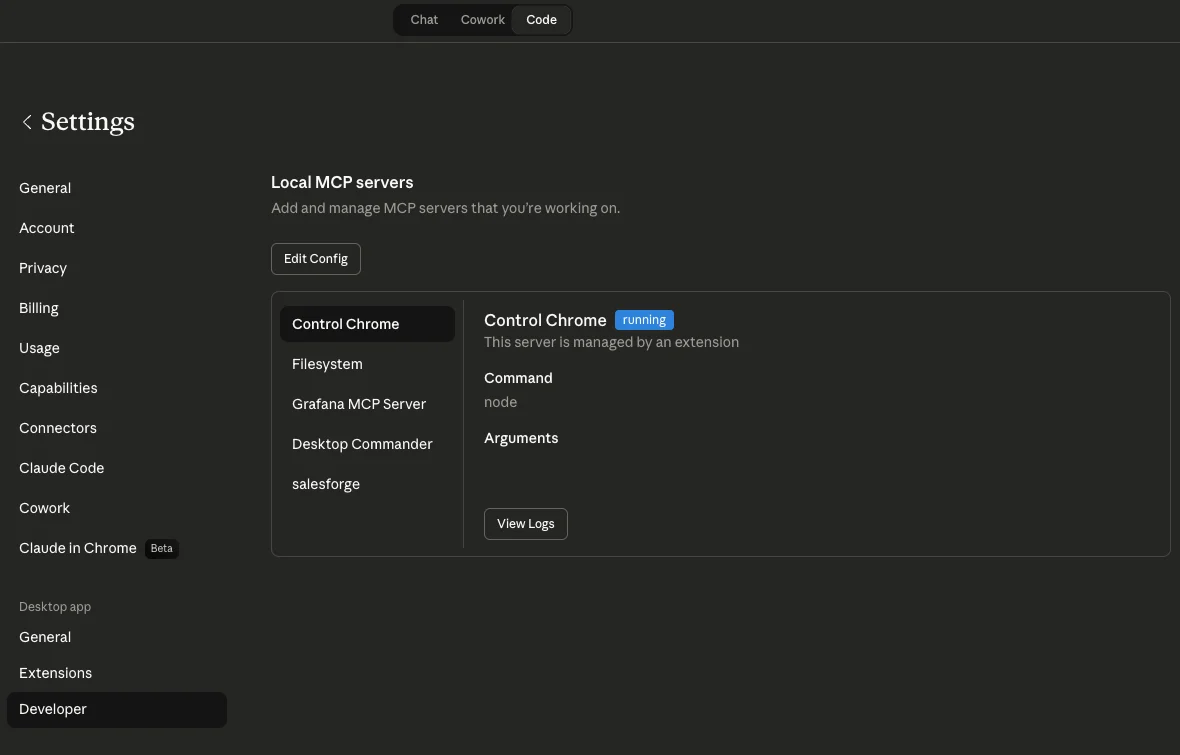
That opens claude_desktop_config.json. Paste the block below and replace each placeholder with the real key. Delete any header line for a product you do not use.
{
  "mcpServers": {
    "salesforge": {
      "command": "npx",
      "args": [
        "-y",
        "mcp-remote",
        "https://mcp.salesforge.ai/mcp",
        "--header",
        "X-Salesforge-Key:YOUR_SALESFORGE_API_KEY",
        "--header",
        "X-Primeforge-Key:YOUR_PRIMEFORGE_API_KEY",
        "--header",
        "X-Leadsforge-Key:YOUR_LEADSFORGE_API_KEY",
        "--header",
        "X-Infraforge-Key:YOUR_INFRAFORGE_API_KEY",
        "--header",
        "X-Warmforge-Key:YOUR_WARMFORGE_API_KEY",
        "--header",
        "X-Mailforge-Key:YOUR_MAILFORGE_API_KEY"
      ]
    }
  }
}
Save the file. Restart Claude Desktop. Open a new chat, click the tools icon, and toggle the Salesforge MCP on.
If you use Claude Code instead, run this in your terminal. Only include the headers for products you actually use.
claude mcp add salesforge \
  --transport streamable-http \
  --url https://mcp.salesforge.ai/mcp \
  --header "X-Salesforge-Key: YOUR_SALESFORGE_API_KEY" \
  --header "X-Primeforge-Key: YOUR_PRIMEFORGE_API_KEY" \
  --header "X-Leadsforge-Key: YOUR_LEADSFORGE_API_KEY" \
  --header "X-Infraforge-Key: YOUR_INFRAFORGE_API_KEY" \
  --header "X-Warmforge-Key: YOUR_WARMFORGE_API_KEY" \
--header "X-Mailforge-Key: YOUR_MAILFORGE_API_KEY"Open a new chat and try one of these:
If the connection works, you will see data from your account right away. If tools do not show up, restart the client. If authentication fails, double-check the key. If a tool says invalid workspace, run the list-workspaces tool first to grab a valid ID.
If you manage separate Salesforge accounts for different clients, you can run multiple MCP instances at once. Each one gets its own name and its own set of API keys.
{
  "mcpServers": {
    "salesforge-client-a": {
      "command": "npx",
      "args": [
        "-y", "mcp-remote", "https://mcp.salesforge.ai/mcp",
        "--header", "X-Salesforge-Key:CLIENT_A_SALESFORGE_KEY",
        "--header", "X-Primeforge-Key:CLIENT_A_PRIMEFORGE_KEY"
      ]
    },
    "salesforge-client-b": {
      "command": "npx",
      "args": [
        "-y", "mcp-remote", "https://mcp.salesforge.ai/mcp",
        "--header", "X-Salesforge-Key:CLIENT_B_SALESFORGE_KEY",
        "--header", "X-Primeforge-Key:CLIENT_B_PRIMEFORGE_KEY"
      ]
    }
  }
}
In your prompts, tell Claude which client you want to act on. It picks the right tools from the right instance automatically. This is how agencies handle multi-account workflows without mixing data.
Most MCP integrations mean OAuth flows, a deployed server, credential management, and engineering time. The Forge MCP Server skips all of it. API key, one config block, done.
The tools, the diagnostics, the signals it monitors, all designed around what actually matters in an outbound sequence. Deliverability, reply rates, mailbox health, bounce rates, warmup heat scores, domain reputation. Not a generic CRM wrapper. An AI that understands outbound the same way you do.
Salesforge handles email and LinkedIn from one platform. The Forge MCP Server exposes both channels. Claude can manage a multi-channel sequence through a single connection, which is something most cold email MCPs cannot do.
Most tools give AI agents access to one slice of the picture. The Forge MCP Server gives Claude the whole thing: lead data via Leadsforge, infrastructure via Infraforge and Primeforge, warmup via Warmforge, sending and sequence logic via Salesforge. When something goes wrong, Claude is not guessing at the cause. It can look at every signal across the stack at once.
A natural question I get: if Agent Frank already runs outbound autonomously, what is the MCP server for?
They solve different problems. Agent Frank is an AI SDR. He prospects, writes, sends, follows up, and books meetings on your behalf. He is running the outbound motion. The Forge MCP Server is the programmatic layer underneath — the way any AI assistant, whether Claude Desktop, Claude Code, Cursor, or your own agent, can read and act on Salesforge data directly.
Cold email still depends on the basics. Good copy matters. List quality matters. Timing matters. MCP does not change that.
What it does change is how much manual work sits around the job. Creating sequences, checking performance, spotting problems, and managing campaigns takes less time and fewer steps.
An email MCP server is a general-purpose integration connecting AI tools to email platforms, usually built for newsletters and marketing. A cold email MCP server is built for outbound: warmup schedules, mailbox rotation, deliverability diagnostics, sequencing, reply detection, and sender reputation. The data structures and workflows are different.
Yes. It is called the Forge MCP Server. One endpoint — https://mcp.salesforge.ai/mcp — exposes Salesforge, Primeforge, Leadsforge, Infraforge, Warmforge, and Mailforge as native tools inside any MCP-compatible AI client.
Yes. Setup is one config block in Claude Desktop or one terminal command in Claude Code. No OAuth flows, no deployed servers, no engineering team needed. Most people finish setup in under five minutes.
Any client that supports the Model Context Protocol. That includes Claude Desktop, Claude Code, Cursor and a growing list of others.
No. You only need keys for the products you use. If you do not have a Leadsforge account, skip that header and the Leadsforge tools simply will not appear. This keeps the tool list clean and avoids errors from unconfigured products.
Yes. That is the headline use case of the Forge MCP Server. You describe the campaign in plain English - the ICP, the pain point, the CTA, the channel, the tone, the schedule, and Claude writes every step, creates the sequence inside Salesforge, assigns mailboxes, sets delays, and activates it. if you ask. Subject lines, body copy, follow-ups, and schedule all populate automatically. You do not have to open the Salesforge UI to build the campaign you just need to review it before it sends.
Yes. Salesforge handles email and LinkedIn from one platform, and the Forge MCP Server exposes both channels as tools. Claude can manage a multi-channel sequence — create it, assign mailboxes and LinkedIn senders, activate it — through a single connection.
Run multiple MCP instances side by side. Each one gets its own name (salesforge-client-a, salesforge-client-b, and so on) and its own set of API keys. In your prompts you tell Claude which client to act on. It routes the request to the correct instance automatically.
.jpg)

.jpg)