If you've ever struggled with figuring out how to address multiple people in an email without making it awkward or unprofessional, this blog is for you.
Every business that wants to scale faces the challenge of managing email communication effectively.
You, me, and everyone know how important it is to get emails right.
But there's a massive challenge not everyone talks about— email etiquette when addressing multiple recipients.
Yes, I know you already send group emails, but so does every business out there.
So how do you make sure your emails stand out, feel personal, and still get delivered without any issues?
In this blog, I'll show you:
Don't miss out on these essential tips for scaling your email outreach and improving your communication.
Let's dive in!
Practicing proper email etiquette when addressing multiple recipients is essential for clarity, professionalism, and maintaining a respectful tone in group communications.
Whether it’s formal or informal, getting the structure and tone right can make all the difference.
The proper way to address multiple recipients depends on the group size and context, so choosing an appropriate and inclusive greeting is important.
Using gender-neutral language in both greetings and the email body is crucial to promote inclusivity and respect, reflecting a commitment to diversity.
Let’s explore how you can address multiple recipients effectively.
Your greeting is the first impression your email makes.
When addressing multiple recipients, using a collective greeting or group greetings is important for inclusivity and setting the right tone.
For smaller groups of two or three people, it’s always best to greet them by name.
This keeps the tone personal, even if you’re addressing multiple recipients:
When addressing two or three people in an email, you can mention their names in the email salutation, such as "Hi Mike, Angela, and Max."
1.1.2 For larger groups, a general greeting like "Hi team" or "Dear colleagues" is usually more practical. Examples include:
A formal group greeting example: "Dear colleagues," is suitable for professional or corporate contexts.
You can also use a morning greeting, such as "Good morning, team," to start your email respectfully.
Choose your words carefully to ensure your greeting is clear, inclusive, and sets the right tone for your message.
For larger groups, where naming each person individually isn't practical, a general greeting works just fine:
Important Tip: When addressing groups, match the greeting to the context and ensure it’s respectful and clear.
Now that you’ve handled the greeting, the next step is figuring out how to address specific groups, like supervisors or small teams, while maintaining professionalism.
When emailing two supervisors or a small group of important people, it’s important to balance respect and clarity.
Practicing proper email etiquette and knowing the proper way to address multiple people in professional settings ensures your message is clear and maintains professionalism. When emailing multiple people, it's important to respect formal titles and list recipients in order of seniority or alphabetically.
Make sure you address each person by name, and keep the order neutral, like alphabetically or based on titles.
In professional settings, the order in which you list recipients should be intentional, often starting with the most senior person.
When addressing supervisors or senior colleagues, use formal titles and list names neutrally
For Example: "Dear Mr. Frank and Ms. Lara."
For casual settings, first names are acceptable:
For Example: "Hi Rita, Tom, and Alisha."
The goal is to make sure everyone feels equally acknowledged. For follow-up emails, a simple "Hi all" can work to keep the conversation going smoothly without repeating names each time.
By addressing each person properly, you set the right tone from the start. But what happens when you're emailing larger groups, like an entire department? Let's move on to that.
Related Read 👉: How to Send an Email to Multiple Recipients Individually? [3 Proven Methods You Need To Know]
When addressing a larger department or group, listing individual names isn’t practical.
Once the group exceeds four people, listing individual names can become clunky, so it's better to use a group title.
In these cases, use a group label or a collective greeting such as “Dear marketing team,” “Hello customer service department,” or “Dear colleagues” to make sure everyone feels included.
Collective greetings and group greetings are especially useful for departments or large groups, as they simplify the process and maintain a respectful, inclusive tone.
Here are some best practices to keep in mind when addressing a department or group:

Generate Subjectline from AI Subject line Generator
When you’re emailing someone whose name you don’t know, using a neutral greeting is your safest option. Here are some common approaches:
Using gender neutral language in your greetings and throughout your email ensures inclusivity and respect for all recipients.
Whenever possible, try to find out a bit more about the person to make the email more personalized.
For instance, if you know their job title but not their name, you can say, “Dear Customer Support Manager.” If you know the recipient's gender and last name, a formal and respectful option is to use “Dear Ms. [Last Name]” or “Dear Mr. [Last Name].”
And when you’re unsure of someone’s title or gender, stick with a neutral approach, like using their full name: “Dear Alex Johnson.” This avoids any awkwardness.
Sometimes, when you’re sending an email to a group, you’ll need to include people in the CC or BCC fields.
When addressing multiple people in email, it's important to identify the primary recipients by placing their addresses in the 'To' field, as these are the main people expected to respond or act.
These are important tools for mail communication, especially when you want to keep certain people informed without directly addressing them. The placement of email addresses indicates the recipient's expected role: primary recipients in the 'To' field, informative recipients in 'CC,' and privacy-protecting recipients in 'BCC.'
Let’s break down what CC is and how you can use them effectively. Mail tools can also help manage multiple recipients and their roles efficiently.
When you add someone to the CC field, it means you are sending them a carbon copy of the email.

The recipients in the CC field are not the main people you're addressing, but they're being looped in for visibility or informational purposes. Here's what you need to know about CC:
When you CC someone in an email, it's important to understand that the people in the "CC" field are usually there for visibility, not direct involvement. Therefore:
Important Tip:
When you’re using CC, you don’t need to mention the CC’d people in the body of the email. Focus on the main recipients in the "To" field and address them directly. For example:

Notice how Amanda, who is CC’d, isn’t addressed directly in the body. She’s just being kept informed.
When privacy is a concern, such as when sending a company-wide email or newsletter, using BCC (Blind Carbon Copy) is essential to protect recipients’ information.

BCC field stands for Blind Carbon Copy. This works a bit differently from CC. When you add people to the BCC field, they can't see who else has been BCC'd, nor can the main recipients see that anyone else is on the email. Here's how it works:
Important Tip:
BCC is often used when you want to send emails to a large group of people without exposing everyone's email addresses. It’s useful for newsletters, announcements, or any mass communication where privacy is a concern.

In this case, no one will know who else received the email, which keeps all email addresses private.
By understanding the difference between CC and BCC, you can ensure your emails are clear, professional, and respectful of privacy.
Scaling email outreach to hundreds or even thousands of recipients comes with its own set of challenges.
One of the biggest problems businesses face is personalizing emails at scale without losing the human touch. The Gmail interface offers features like BCC and mail merge to help manage multiple recipients efficiently, making it easier to address multiple people in email communications.
Salesforge helps to automate the process of scaling emails while maintaining a high level of personalization.

Salesforge makes email campaigns easy by offering key features that solve these common problems:

Must read 👉: 45+ Cold Email Deliverability Checklist Based On Google Latest Guidelines [2024]
Using mail merge and automation tools like Salesforge can save time when sending mail to many recipients, making your outreach more efficient.
Here’s what Ryan has to say in his review:

By following these strategies and leveraging Salesforge, you’ll be able to address multiple people in emails with ease.
When you’re sending a group email, it’s important to follow some basic rules to make sure your message is clear and professional. You and I both know that group emails can get messy if not done right.
If multiple people are on the mail, use the @ symbol in the body to clarify responsibilities.
So, let’s go through a few do’s and don’ts to help you avoid any common mistakes.

Professionalism is key when sending emails to multiple recipients. Practicing proper email etiquette and knowing the proper way to address multiple people in formal settings ensures clarity, professionalism, and respect in your communications.
Here’s a table summarising formal email etiquette:
let's dive deeper into each point.
When you’re emailing a group, you need to be as clear as possible. Make sure your message is easy to understand, especially if different people in the group have different responsibilities.
You don’t want someone to miss something important just because the message was too vague.
For example, instead of saying, “Can someone look into this?”

you could say, “Frank, can you please review the report and share your feedback by Friday?”

By addressing people directly, it becomes clear who needs to take action.
We’ve all been there—you’re in a group email thread and someone hits “Reply All” when they only needed to reply to one person.
It clogs everyone’s inbox and can be frustrating. So, unless it’s necessary for everyone to see your response, always reply to the sender directly.
Think of it like this: If what you’re saying doesn’t benefit everyone, it’s better to keep the conversation one-on-one.
For example:
Don’t Unnecessary Reply All
Instead reply only to the relevant person:
Note: In this version, you’ve only replied to John, who needs the response, avoiding cluttering everyone else’s inbox
When sending group emails, you should keep your message brief and to the point. Long emails can overwhelm people and may lead to important details being overlooked. Try to break your information into short, clear sections.
Let's say you're sending an update to a project team. Don't write like this:
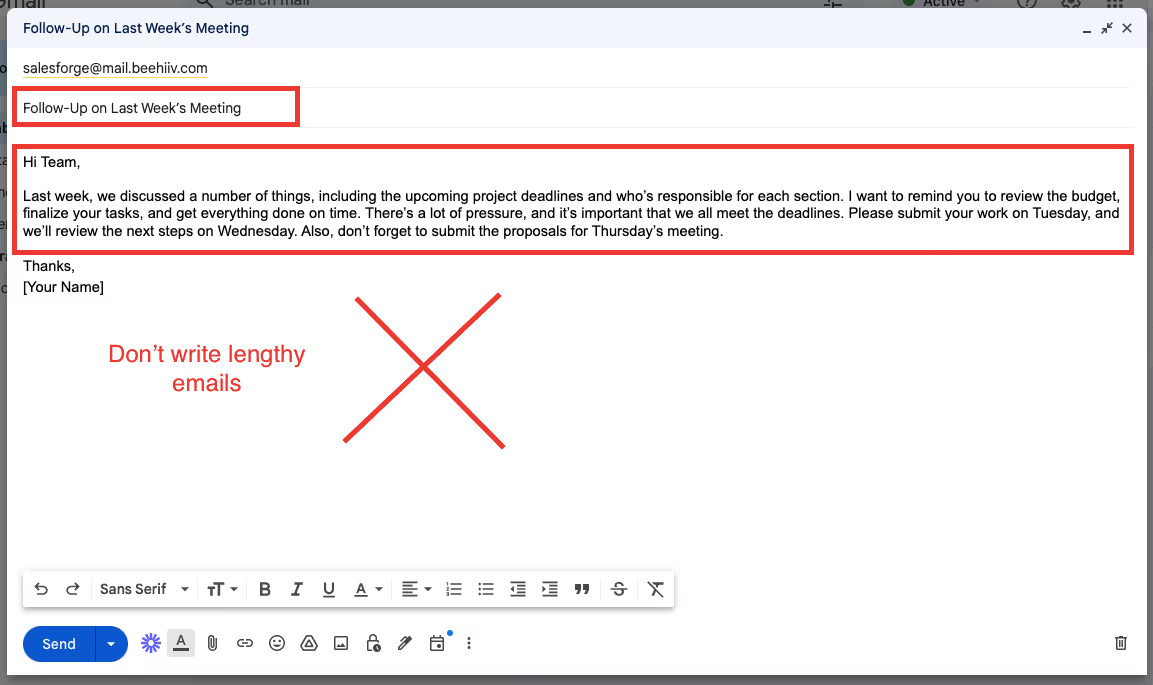
Instead, make it short, clear, and organized. You could structure your email like this:
For example:

By using clear sections, you help the group easily find the information they need.
The subject line is the first thing people see, so make sure it reflects the content of your email. A clear, direct subject line helps recipients quickly understand the purpose of your message.
For example, instead of using a vague subject like “Important,”

use something more specific like “Project Update: Deadline Extended to Friday.”

This gives the reader a quick understanding of what the email is about, even before opening it.
When you're emailing a group, don't assume that everyone knows the background of the topic you're discussing. Provide enough context so that everyone is on the same page. A simple sentence or two explaining the situation can make a big difference.
For instance, if you're asking for feedback on a report, Don't say like this “feedback on the report”

you could say,

“As discussed in last week’s meeting, we’re reviewing the Q3 sales report. Please share your thoughts by Thursday.”
This ensures that no one feels lost or confused about what you're referring to.
By following these do's and don'ts, you'll make sure your group emails are clear, respectful, and effective.
Group emails don't have to be complicated—you just need to keep your message direct, avoid clutter, and make sure everyone knows their role.
Following email etiquette rules for hundreds of prospects manually? There's a better way.
Apply these professional standards automatically across massive outreach campaigns with Salesfroge.
When we think of email challenges, we often focus on things like spam or inbox clutter.
But there are several deeper, more subtle challenges with emails that people rarely discuss. One such challenge is how to address many recipients in an email, which requires the use of inclusive and gender-neutral language to ensure everyone feels respected.
Let’s dive into some of these often-overlooked challenges and how you can work better with the right tools.
You and I both know that emails lack tone. No matter how carefully you craft your message, the recipient might interpret it differently.
A friendly message might come across as too casual, while a professional email could seem cold or distant.
This can create misunderstandings and even tension between you and the recipient.
helps address this with its advanced AI-powered personalization. You can ensure that each email feels naturally personalized, reflecting the recipient's profile or context, which reduces the risk of tone misinterpretation.
Have you ever been stuck in a never-ending email chain where the conversation gets confusing?
Long email threads can easily become overwhelming, with multiple people responding at different times and addressing different parts of the conversation. Important points get buried, and it's difficult to track actions.
With Mailforge, you can streamline long email threads by using its bulk email management and automated sequencing features.

These allow you to send follow-ups based on previous actions or responses, keeping your communication structured without overwhelming the recipients.
Plus, Mailforge's email tracking gives you insights into who's actually engaging with your emails, so you know where the thread needs follow-up.
We've all experienced inbox overload—too many emails, too little time.
But email fatigue is more than just a full inbox. It happens when people start to mentally tune out emails because they receive so many.
Important messages can easily get lost or ignored because recipients are simply too tired to read them all.
It's frustrating when you send an important email and don't get a response right away.
What's worse is not knowing why—did the recipient miss your email, are they too busy, or are they simply ignoring it? This leads to uncertainty and delays in getting things done.
Mailforge's tracking features allow you to monitor when an email is opened, and whether links or attachments are clicked. This gives you real-time insights into how your emails are being received and whether it's time to send a follow-up.
We often send sensitive information through email without thinking twice, but emails aren't as secure as we might assume.
Hackers can intercept emails, and data breaches happen all too often. Sending confidential information like passwords, financial data, or personal details via email is risky.
Salesforge offers automated SPF, DKIM, and DNS setup, which help ensure that your emails are authenticated and seen as legitimate.

This reduces the risk of your emails being intercepted or flagged as suspicious, so you can feel confident sending even sensitive information.
Including too many people in the CC field is a common mistake that can cause confusion and overwhelm. When you CC everyone on an email, the message loses focus, and people may assume someone else will take care of it.
Plus, it can lead to inbox clutter for people who don't really need to be involved.
Instead of mass CC-ing everyone, Salesforge allows you to target your emails effectively with bulk campaigns that are still personalized.
You can segment recipients based on their role or involvement, ensuring that each person gets the right message without flooding inboxes with irrelevant emails.
Most of us check emails on our phones, but not every email is designed with mobile users in mind. If an email isn't formatted properly for mobile devices, it can be hard to read, leading to missed information or a poor impression of professionalism.
These tools make the process smoother, allowing you to focus on what really matters: building meaningful connections and driving results.
So, there you have it: you've learned how to address multiple people in an email.
Not only that, you now know the tricks for greeting groups, avoiding those dreaded "Reply All" situations, and keeping your messages clear without overwhelming anyone.
But let's be real—manually personalizing each email, managing large groups, and ensuring everything stays professional is a headache.
You'd be better off with the alternative approach offers through advanced AI-powered personalization and CRM integrations.
With , your emails are automatically tailored to each recipient, and everything syncs seamlessly with your CRM.
No more juggling spreadsheets or copying and pasting— makes sure your contacts stay updated and your outreach runs smoothly.
Still unsure?
No worries—you can try Salesforge risk-free with our 7-day free trial. No credit card is needed, just your email, and you’re all set!
.jpg)

.jpg)