If you're about to put a credit card down on Instantly.ai, slow down for ten minutes.
The advertised $37.60/month Growth plan billed annually stacks to roughly $150/month once you add SuperSearch, CRM, and Inbox Placement.
Warmup heat scores have been disagreeing with real inbox placement in 2026.
And the product is still email-only, with no LinkedIn channel and no unified inbox across channels.
This isn't an Instantly takedown. The product is solid for what it sets out to do. It's a hard look at what Instantly chose to ship in 2026, and whether that direction lines up with where outbound teams are heading.
Most of what Instantly added in 2026 sits behind a separate subscription.
I ran a Hypergrowth account ($77.60/month billed annually) for 30 days across 12 inboxes to see what holds up and what doesn't.
This article covers what I found across features, real annual pricing, what users on Reddit and G2 are saying, and the best alternative if Instantly turns out not to fit.
For teams who want cold email and LinkedIn in one platform, Salesforge is the strongest alternative at $40/month (billed annually), with unlimited mailboxes, free unlimited warm-up via Warmforge, 6 LinkedIn actions, and Primebox for replies across both channels.
See the full feature comparison below before deciding.
Here's the head-to-head against Salesforge, the alternative I recommend below for teams hitting Instantly's email-only ceiling.
The table covers the 14 features that matter most to outbound teams in 2026.
Numbers tell one story. Reviews tell another.
Before I share my 30-day testing notes, here's what's showing up across Reddit, Trustpilot, and G2 in 2026, paraphrased patterns plus a handful of verbatim quotes pulled directly from the source.
What’s hitting Reddit hardest in 2026 isn’t the product itself.
It’s the gap between dashboard scores and real-world deliverability, even though instantly's email warmup is supposed to gradually increase sending volume to build sender reputation and improve email deliverability.
Multiple r/coldemail threads through Q1 2026 surfaced the same pattern.
Warmup heat scores reading 90+ while live campaigns hit 30–40% spam placement.
One thread that ranks on the first page of Google for “instantly.ai review” is titled “Instantly.ai Just Admitted Their Warmup Network Got My Brand New Domains Reputation Blocked.” That thread isn’t an outlier. It’s a pattern in the cold email space.
Other recent r/coldemail threads echo it. “Instantly Issues“ covers campaigns failing to send without warning. “
Instantly Warmup Score vs Reality“ surfaces the exact dashboard mismatch I tested in Section 5.2 below.
“Rant: Instantly“ documents support response delays during a deliverability crisis, and that matters even more for sales teams running high volume campaigns from multiple accounts.
The recurring frustration: when something breaks, the instantly dashboard tells power users everything is fine, but instantly ai still gives limited visibility into connected accounts, sender reputation, or whether you’re hitting gmail.
Instantly's current Trustpilot rating is 4.0/5 across 660K+ reviews.
The recent reviews tell a more critical story than the aggregate number suggests, with three patterns showing up across the 1-star and 2-star reviews.
These aren't the dominant Trustpilot voice. They're the loudest recent voice.
Instantly holds a 4.8/5 rating across 3,800+ reviews on G2.
Reviewers often see instantly ai as a good starting point for beginners because the interface is easy to navigate.
Miguel, a small business owner, called out the warmup tool, saying “the email warmup is very useful to not go to SPAM,” per his G2 review.
Lukáš M. flagged Unibox, noting “Unibox is a great tool to manage emails,” per his G2 review.
The critical G2 reviews tend to come from teams who tried to scale.
Tizian R., a CEO, wrote that “the pricing model can get a bit expensive due to account limits,” per his G2 review. That captures it well. Instantly is built for high-volume email senders, and the volume math gets uncomfortable above ~25,000 contacts.
The pattern across G2: Instantly is rated highly for what it sets out to do, especially among teams doing high-volume B2B lead generation. Critical reviews tend to flag the things it doesn’t do, not the things it does badly.
Three platforms, three stories.
G2 paints Instantly as a top-tier cold email tool.
Trustpilot and Reddit paint a more complicated picture, one where deliverability dashboards don't always match real placement, and where support response times have become a recurring frustration.
The important question is if Instantly is your only cold outreach tool. Deliverability problems aren't recoverable across other channels when you don't have other channels.
I signed up for the Instantly Hypergrowth plan ($77.60/month billed annually) and ran it for 30 days.
Connected 12 inboxes across 3 separate domains. Ran the built-in warm-up for the first 14 days. Launched a 1,000-contact test campaign to a verified ICP list in the SaaS sales tech space.
I bought SuperSearch credits to test the lead finder. Activated the AI Reply Agent and watched it handle 47 incoming replies. Ran the Inbox Placement Test twice, once at day 14 and once at day 28.
Exported analytics weekly.
Here's what every feature looked like in practice.
What I tested: Built a 5-touch sequence with conditional steps and A/B subject lines, distributed across the 12 inboxes. Ran it against the 1,000-contact ICP list over a 14-day send window.
What I liked: The campaign builder is the cleanest in the cold email category. Multi-inbox sending works as advertised. I never hit Gmail or Outlook sending limits because Instantly spreads volume across all 12 inboxes automatically. The conditional logic supports basic branching, which is enough for most cold email use cases.
What could be better: There's no native LinkedIn step. If I wanted to layer a LinkedIn touchpoint between emails, I needed a second tool. A/B testing is limited to 2 variants, where some competitors offer A/Z testing with multiple variant streams.
My take: Best-in-class for pure email sequences. The limitation only shows up when you want multichannel, which is increasingly the default ask for outbound teams in 2026.
What I tested: Connected all 12 inboxes to Instantly’s built-in warmup and monitored heat scores daily for 14 days before sending. Re-tested with an Inbox Placement Test at day 14 and day 28.
What I liked: Zero configuration. Instantly's email warmup runs automatically once an inbox is connected, and like most cold email automation platforms it gradually raises send volume and mimics engagement to build sender reputation. The instantly dashboard view across all 12 inboxes is easy to read.
What could be better: The dashboard score wasn’t a reliable proxy for inbox placement or overall email deliverability on its own. Three of my inboxes showed heat scores above 85 at day 14, but the Inbox Placement Test revealed 32%, 38%, and 41% spam placement respectively, with no ai suggested fixes to explain the gap. That gap is the exact pattern the r/coldemail community has been flagging through Q1 2026.
My take: Solid foundation but you can’t only trust the dashboard score. Verify with a real placement test before any major campaign launch. This is also where Salesforge’s free unlimited warm-up via Warmforge reads differently. Salesforge ties heat score targets above 85 to actual inbox placement monitoring at no extra cost, where Instantly charges $37.60/month (billed annually) for the Inbox Placement Test as a separate module.
What I tested: Pulled 200 leads using Instantly’s built-in B2B lead database, SuperSearch, which claims 450M+ verified contacts, with ICP filters: SaaS companies, 50–500 employees, US-based, specific job title targeting for “Head of Sales,” plus the AI-powered search to speed up list building. Imported them into a test campaign.
What I liked: The company lookalikes filter is useful. You feed in a domain and SuperSearch returns similar companies, which is harder to do cheaply elsewhere. The one-lead-per-company filter is a small thing that signals SuperSearch was built with a cold email mindset. It also fits a broader tech stack better than a basic list tool because you can move from prospecting to outreach in one place, and it helps surface warm leads if you already know the accounts you want to target.
What could be better: The 450M database is smaller than Saleshandy’s 800M+ or Leadsforge’s 500M+ with waterfall enrichment. Verification accuracy in my test was around 85%, with the rest being hard bounces or invalid addresses, so data quality is still something to watch for list hygiene and deliverability. The credit-based pricing makes per-lead cost less predictable, and email verification credits are worth considering if you need to clean lists before outreach.
My take: Useful if you want everything in one tool for smaller sales teams. Lacking if data accuracy is the top priority for your campaigns.
What I tested: Monitored replies across all 12 inboxes for 30 days through Unibox. Tested AI Custom Reply Labels for interested, not interested, OOO, and booked categories.
What I liked: Unibox is the centralized inbox inside the instantly dashboard for managing replies from connected accounts. Single-pane reply view across all 12 inboxes works as expected, especially when you’re handling multiple accounts from one place. AI Custom Reply Labels auto-categorize incoming replies, which saves time when you’re handling 40+ replies a week.
What could be better: No LinkedIn reply view. If you’re running LinkedIn outreach alongside cold email, you’ll need another tool to manage those replies separately. Manual label edits also didn’t sync back consistently in my testing, which is a small but real friction.
My take: Solves the multi-inbox reply problem for email-only teams. Doesn’t help if you’re running LinkedIn in parallel. This is one of the cleanest examples of Instantly’s email-only ceiling. Salesforge’s Primebox handles both channels in one view, with Co-Pilot mode (AI drafts replies, human approves) and Auto-Pilot mode (AI continues conversations autonomously).
What I tested: Tracked open rates, click-through rates, reply rates, response rates, bounce rates, and unsubscribe rates at the account, campaign, and step level across the full 30 days. Exported reports weekly and reviewed the key features available in reporting.
What I liked: Three-level granularity (account, campaign, step) is more than most direct competitors offer. The step-level breakdown helped me identify that touch #3 was driving 60% of replies, which informed how I structured a follow-up sequence.
What could be better: No real-time alerts when deliverability drops. No spam-content checker on outgoing copy. Export options are basic CSV with no API push to external BI tools. Instantly’s AI Copilot can surface insights from analytics and offer AI-suggested fixes for campaign improvements, but in my test those recommendations felt fairly limited. For an agency running 5 client accounts in parallel, the reporting depth doesn’t quite get there.
My take: Sufficient for spotting trends. Missing the live diagnostic depth a serious agency would want.
What I tested: Ran two placement tests during the 30 days. One at day 14 (post-warmup, pre-campaign). One at day 28 (mid-campaign, after ~15,000 emails sent).
What I liked: Tests across multiple seed accounts (Gmail, Outlook, Yahoo). The provider-level breakdown identifies which inbox is flagging you, which is hard to diagnose without this tool.
What could be better: Costs $37.60/month minimum (billed annually) on top of the base Outreach plan. It doesn’t auto-trigger when issues arise, so you’ll only catch a problem if you remember to run a test manually. For something this diagnostic, an alert system would be more useful than a dashboard. It helps surface email deliverability issues, but more advanced infrastructure controls like a dedicated IP address are usually reserved for higher-tier plans and don’t solve sender reputation on their own.
My take: Diagnostic only. It tells you the problem, doesn’t fix it. Worth running before any major campaign launch, but treat it as an audit tool, not a deliverability solution.
What I tested: I did not use the DFY service this round. I used my own domains and ran the standard 14-day warmup. Instead, I reviewed the reported flagging issues from Reddit and G2 across the past six months.
What I liked: In theory, the done-for-you option removes 2–4 weeks of setup work for new teams. Instantly buys the domains, configures DNS and email, creates the accounts, runs warmup, and hands you accounts ready to send if you want a hands-off option.
What could be better: Multiple r/coldemail threads in 2026 flagged DFY domains arriving with poor reputation. Users say accounts ended up unusable after a few weeks, sometimes after the warmup window had already passed. The Reddit thread “Instantly.ai Just Admitted Their Warmup Network Got My Brand New Domains Reputation Blocked” is the most explicit version of this complaint.
My take: Skip the DFY route. Use your own domains, do your own warmup. The time saved isn’t worth the reputation risk if a batch comes back poisoned.
What I tested: Set up the Growth CRM ($37.90/month billed annually), which is a built-in but basic CRM for managing leads and tracking deals. Synced the 200 SuperSearch leads. Ran a kanban view for one campaign across deal stages.
What I liked: Adequate as a reply-management layer with deal-stage tracking. The kanban view is clean. Notes and tasks are tied to specific leads. On the top-tier plan, it also supports multi-channel outreach with SMS and call management, and you can push leads into HubSpot or Salesforce for cleaner follow-up.
What could be better: It’s not really a full sales engagement platform. It’s a kanban view tied to campaigns. There’s no multi-pipeline support, no real reporting beyond what’s in the campaign analytics, and its pipeline views and task automation are limited compared with HubSpot or Salesforce. The Instantly community itself often calls it the feature the team regrets releasing.
My take: Skip it if you have a real CRM already. Salesforge takes the opposite approach. It ties into your existing HubSpot or Pipedrive natively instead of trying to be a CRM itself, which is the cleaner model for most outbound teams managing multiple connected accounts. Established sales teams will usually be better off using native integrations with HubSpot or Salesforce instead of replacing them.
What I tested: Activated the Website Visitors module at the base tier ($77.60/month billed annually). Installed the pixel on a test landing page and ran for 14 days.
What I liked: RB2B-style anonymous identification works. The pipeline from “visitor lands on page” to “lead in campaign” is short. For teams with real landing-page traffic, this surfaces visitors who never filled a form, especially warm leads who already showed buying intent.
What could be better: The base tier is $77.60/month (billed annually) for 500 credits per month, which goes fast if your landing pages get any volume. Visitor-to-contact match rate varied between 22% and 35% in my 14-day test. For comparison, dedicated tools like RB2B publish similar match rates, but at module-level pricing rather than as a top-tier add-on.
My take: Useful if you have real traffic on a landing page. Expensive if you don’t, especially since this feature is often packaged inside broader cold email software bundles for SDR teams and agencies.
Instantly’s published pricing is structured around modules, and each one effectively needs its own subscription, which is why costs rise beyond the entry plan.
The Outreach module is the cheap one. SuperSearch, CRM, Inbox Placement, Website Visitors, and Credits are separate.
Here’s every tier in annual billing format, plus the actual stack math for an agency in 2026.
For scaling teams using instantly ai, users often point to premium add-ons like lead finding and CRM as the main reason total spend climbs past $200 per month.
Every Outreach tier includes unlimited connected inboxes/unlimited email account connections, which supports higher-volume sending without hitting Gmail limits as quickly.
In practice, that functions like unlimited account connections and unlimited sending accounts. Email volume caps are the binding constraint.
Here’s the math nobody puts on the pricing page, and where Instantly stops being a good starting point and starts looking expensive for larger sales teams.
A 3-person agency running cold outreach for 5 clients needs Outreach + SuperSearch (for prospect data) + CRM (for reply management) at minimum, with each major add-on effectively requiring its own subscription, which fragments the tech stack. On Hypergrowth-tier modules billed annually:
Subtotal: $230.70/month, or ~$2,768/year.
Add Instantly Credits to power the AI Sales Agent and waterfall enrichment ($42.30/month for the Nano tier) and you’re at $273/month, or ~$3,276/year.
For comparison, Salesforge Growth at $80/month (billed annually) lands at $960/year. That includes unlimited mailboxes, unlimited warm-up via Warmforge, AI personalization in 21+ languages, multichannel email + LinkedIn, Primebox unified inbox, and integrations.
Instantly’s modular pricing is fair when you only need Outreach. It becomes expensive fast when you need the full stack an outbound team actually uses.
Distilled from the 30-day test and the community signals above. Not exhaustive, just the trade-offs that matter most for the decision.
Instantly isn't bad. It's specific. Here's the honest fit assessment, drawn from the 30-day test and the documented community pain points. Use this to decide whether Instantly is the right tool for you before paying for a year of it.
There's a pattern in Reddit and Trustpilot reviews from the past six months. It's not one big complaint. It's four smaller ones that compound.
Here's what's driving the "I switched from Instantly to X" threads showing up in r/coldemail in 2026.
The Outreach base feels affordable until SuperSearch, CRM, and Inbox Placement get stacked.
A 3-person agency running the full stack on annual billing lands at ~$230–$275/month, which is $2,768–$3,300/year before sending volume scales.
The frustration on Reddit isn't the price itself. It's the bait-and-switch feeling, where the advertised $37.60/month Growth plan turns into $150/month after you add the modules an outbound team actually needs to run campaigns.
For comparison, Salesforge Growth at $80/month (billed annually) includes everything most teams stack on top of Instantly. The pricing reads predictably, which is what agencies on multi-year client retainers actually need.
This is the single most-cited Reddit complaint pattern in Q1 2026.
DFY pre-warmed domains arriving with poor reputation. Heat scores reading 90+ while real placement collapses to 30–40% spam.
Salesforge addresses this with Warmforge. Heat score targets above 85, dynamic ESP matching, mailbox rotation, plus inbox placement monitoring at no extra cost. The dashboard score and the real placement number live in the same view, which removes the trust gap that's eating Instantly's reputation on Reddit.
Multiple Trustpilot 1-star reviews specifically cite delayed support during deliverability crises.
Salesforge users get access to a 1K+ Slack community for peer support, plus a dedicated Account Manager for Agent Frank users.
The escalation path is shorter, which matters most when something breaks at 11 PM the night before a client report.
Running 5+ client campaigns on Instantly means separate workspace add-ons.
Per-client workspace costs add up fast for lead gen agencies, particularly the ones running cold email for 10+ clients in parallel.
The Salesforge Growth plan at $80/month (billed annually) includes unlimited workspaces and unlimited users in the flat fee. The math just stops working for multi-client agencies on Instantly's per-workspace model once you cross 5 clients.
If the gaps above sound familiar, modular pricing creep, no LinkedIn channel, warmup scores that don't match reality, weak agency workspace economics, Salesforge is the platform I'd point you to.
I've used both side by side for the past quarter. The structural difference is consolidation.
Salesforge gives you cold email and LinkedIn outreach in one platform, with free unlimited warm-up via Warmforge, AI personalization in 21+ languages, and Primebox handling replies across both channels.
Pricing is flat-rate. Pro at $40/month (billed annually). Growth at $80/month (billed annually). No modules stacked on top.
For teams who'd otherwise be patching Instantly with three more tools, that's the trade you're making.
1. Unlimited mailboxes + users + workspaces. Pro includes unlimited mailboxes and 1 LinkedIn sender. Growth includes unlimited mailboxes, unlimited LinkedIn senders, unlimited users, and unlimited shared workspaces. There's no per-seat, per-mailbox, or per-workspace pricing, which removes the workspace cost problem agencies hit on Instantly past 5 clients.
2. Free unlimited warm-up via Warmforge. Built-in warm-up runs in-house at no extra cost, with heat score targets above 85, dynamic ESP matching, and mailbox rotation. The same dashboard surfaces real placement metrics, which closes the dashboard-vs-reality gap that's eating Instantly's reputation on r/coldemail.
3. AI Personalization in 21+ languages. Prospect-specific AI-generated messages pulling from LinkedIn profiles, company news, and industry context. Instantly's AI personalization is English-first. Salesforge handles non-English campaigns natively, which matters for any team running outbound in European or APAC markets.
4. Dynamic ESP matching. Salesforge automatically routes sends across ESPs to match the recipient's ESP, which improves placement compared to single-ESP sending. The hidden killer of cold email is ESP mismatch (Gmail sender → Outlook recipient gets flagged more often). Dynamic ESP matching is the kind of deliverability feature rarely exposed outside enterprise-tier cold email tools, and it's standard inside Salesforge.
5. Text-only content. Supports plain-text-first sending, which reads cleaner in inbox placement testing than HTML-heavy templates. The Gmail and Outlook spam filters are increasingly aggressive on HTML weight and tracking pixels, and text-only mode sidesteps both. For teams obsessing over inbox placement (which after the 30-day Instantly test is most of them), text-only is the deliverability fix that costs nothing.
6. Sender rotation. Built-in rotation across mailboxes and senders to distribute sending load and protect each individual mailbox's reputation. Mailbox burnout is the silent killer of cold email programs running 8+ inboxes in parallel. Instantly spreads volume across inboxes but doesn't expose rotation logic; Salesforge gives you the controls.
7. Bounce Shield. Automated bounce protection that pauses sends from any mailbox crossing a bounce threshold before reputation damage compounds. This is the feature you didn't know you needed until one of your 12 inboxes starts bouncing 8% of sends and burns its reputation in 48 hours. Bounce Shield catches it at the threshold and stops the bleed.
8. Primebox unified inbox with Co-Pilot + Auto-Pilot modes. Co-Pilot drafts AI replies and waits for human approval before sending. Auto-Pilot continues conversations autonomously and keeps prospects moving. Both modes handle email replies across every mailbox in one view, with bonus capability for LinkedIn replies in the same view when you add LinkedIn. Instantly's Unibox handles email only.
9. Multichannel (conditional sequences). Email + LinkedIn in one sequence with branching logic, conditional steps, A/B testing, and advanced analytics. Even for cold-email-first teams, the option to layer LinkedIn connection requests or messages between email touchpoints is useful for high-ACV ICPs where a single channel isn't enough. Instantly's email-only model forces a second tool for this.
10. Free LinkedIn Email Finder via Chrome Extension. Find verified emails directly from LinkedIn profiles without paying for a separate lookup tool. Instantly has no equivalent free tool. The Salesforge extension is free to install from the Chrome Web Store.
11. Integrations + MCP CLI. Native HubSpot, Pipedrive, LinkedIn Sales Navigator, API, Zapier, and webhooks. Plus the Forge MCP Server, which connects the entire Forge Stack to Claude and other AI agents for programmatic outbound workflows. No Instantly module offers this.
Beyond the core eight, Salesforge ties into the broader Forge Stack under one login.
14-day free trial, no credit card required.
I pulled three verbatim quotes from Salesforge's G2 reviews where reviewers referenced the switch from Instantly directly. Each quote under 15 words, full review linked.
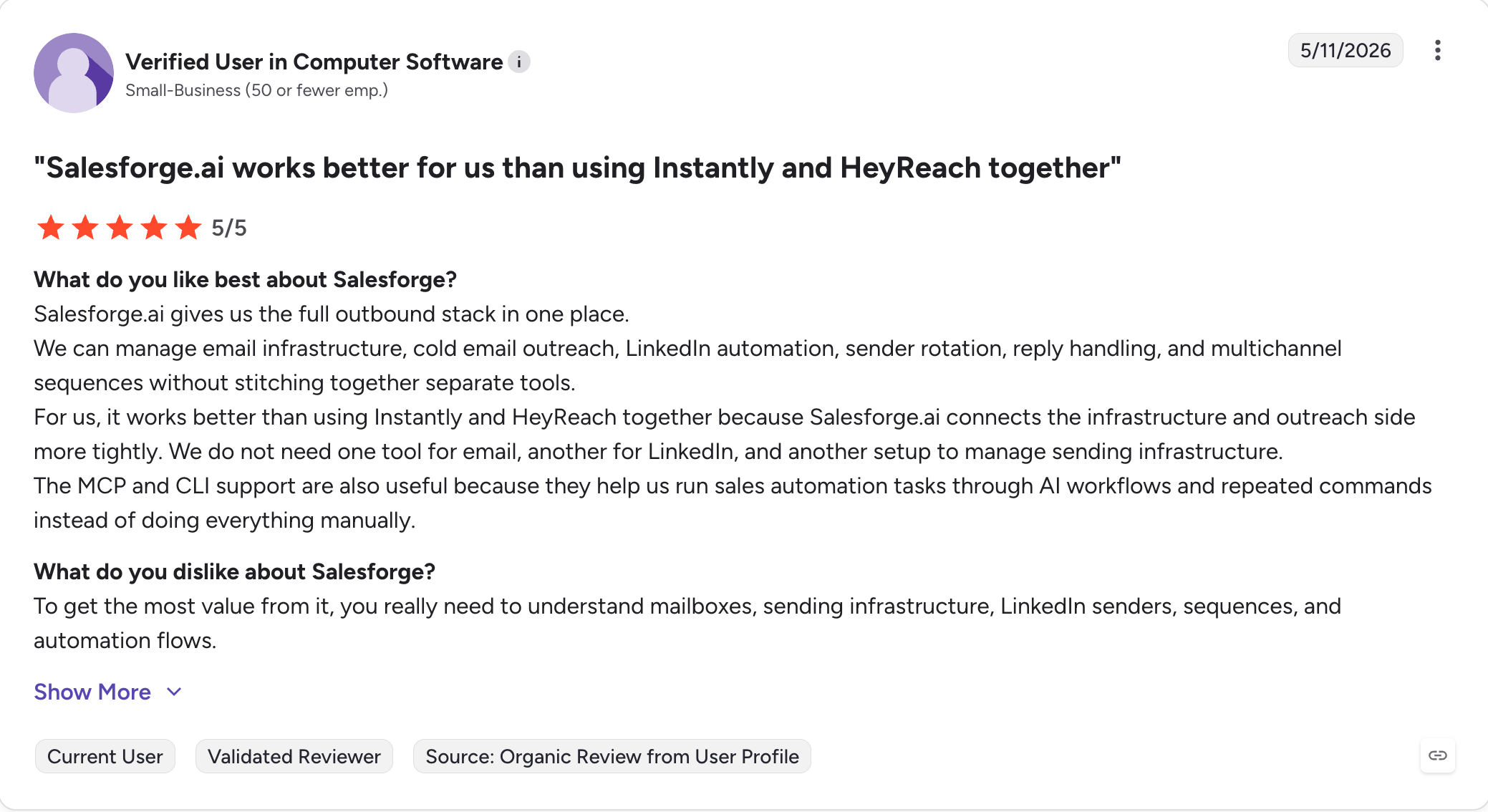
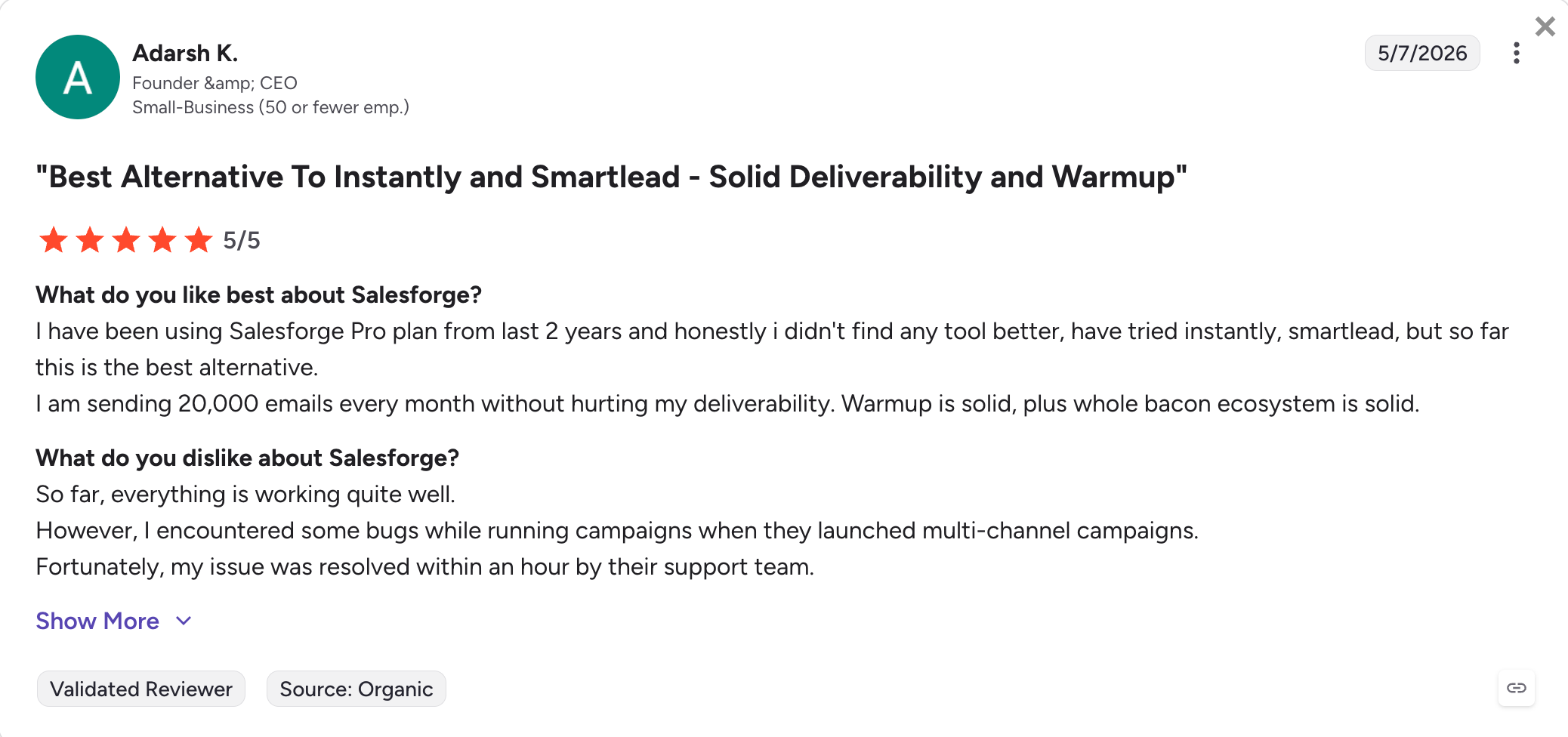

The pattern across switchers tends to come down to the same three things.
Multichannel under one login. Predictable annual pricing. Free unlimited warm-up that doesn't require a $37.60/month diagnostic test to verify.
If cold email is the only channel you’ll ever need, Instantly Growth at $37.60/month (billed annually) stays a defensible buy.
Add your own CRM, your own data, your own inbox placement testing, and the math works for solo operators or one-client agencies.
If you need LinkedIn, multichannel sequences, free warm-up that doesn’t require a $37.60/month diagnostic to verify, and predictable agency pricing under a flat fee, that working stack on Instantly lands at $273/month billed annually.
Salesforge Growth at $80/month billed annually lands the same outcome with consolidation built in.
The choice isn’t which tool is best.
It’s whether to patch or consolidate, and while Instantly wins when you only need scaled email outreach from unlimited accounts, it’s harder to pick Instantly when you need a broader stack.
14-day free trial, no credit card required. Try Salesforge.
.jpg)

.jpg)

.jpg)


